Properties in an Entity Data Type
The Properties in an Entity’s Data Type may vary between types, but there is a general group which is common between most, if not all data types.
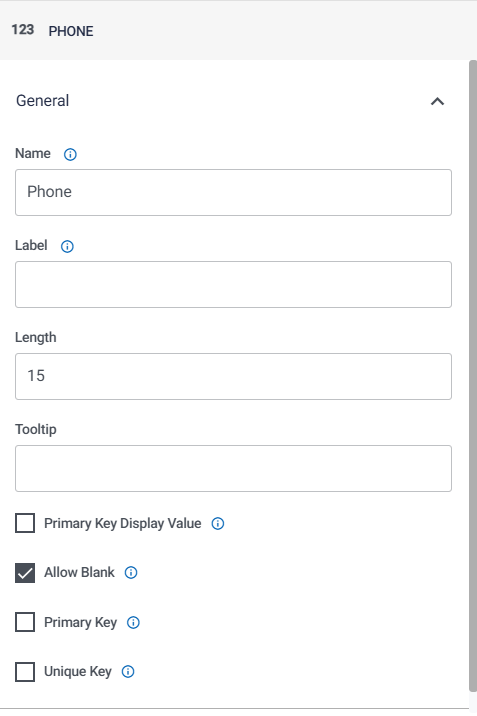
To access the Properties of a selected data type, click on the first tab group, General, on the Properties column on the right side of the screen:
Manual Entry Properties
These properties will need to be set by the user typing in the values required:
- Name: the data field name that should be stored in the database
- Label: the data field name that should be displayed to the user (helps with data mapping)
- Length: the maximum length of entries to that data field
- Tooltip: what the tooltip should say if the data field’s name is hovered over; leaving this blank will disable the tooltip
- Precision: the number of decimal places this field should be rounded to
- Unique to the Decimal data type
- Scale:
- Unique to the Decimal data type
Checkbox Properties
These properties are set by the user ticking the checkbox by clicking on it:
- Primary Key Display Value: selecting this will allow the data field to be used as the Primary Key in place of the default UUID field on the Entity table shown to the user
- Allow Blank: selecting this will allow the field to be non-mandatory
- Primary Key: selecting this will impose Primary Key data restraints on the field; this will be the lone unique identifying column for the table, with non-null and non-duplicate value policies across all values in the field
- Unique Key: selecting this will enforce the non-duplicate value policy on all values in the field
- IsAutogenerate: selecting this will allow the database to automatically generate values for this field
- Recommended for any unique identifying column e.g. UUID.